 AI Safe Lens
 Safety-first AI Business Assistant for Claude Chat – “SABAC”
A practical guide for EU-aligned solo businesses. Meet SABAC, a safety-first assistant you build inside Claude.ai chat. SABAC is not an official term; we like the happy coincidence that the acronym sounds like sobaka (собака), the Russian word for dog, while it hides inside "chat", which happens to be French for cat. Like a well-trained (non-Russian) service dog, your SABAC learns your business: your clients, your voice, your offers, and your limits, and works at your side every day.
Introduction
This guide will help you build a safe AI assistant that knows your business: your clients, your voice, your offers, and your limits.
You will build it using Claude.ai, Anthropic's AI chat. Everything here happens in an ordinary conversation with nothing connected to it. Inside Claude.ai you will use a feature called Projects. You do not need to be technical. You can start on a free account and upgrade to Claude Pro when you want the full version. We will explain the difference clearly when it matters.
Working in chat
There are two ways to work with Claude, and the difference matters. A Project is what we build here. It lives inside a Claude conversation: you type to it, paste text in, and copy results out. Claude sees what you choose to put in the conversation, and nothing else.
Claude can also work directly on your machine. Connect a folder to a conversation, with the desktop app open, and Claude opens, reads, writes and acts on the files inside it, working far more autonomously. Claude Code does the same from a terminal. That is faster and more powerful, but handing an AI direct access to your machine and your clients' data opens a new set of privacy and compliance questions you would need to settle first.
This guide connects no folder. It is the simplest and safest place to start, and everything you build here carries straight over when you do connect one. We point to those next steps in Chapter 6.
What this guide covers
- Setting up SABAC
- Writing the instructions that make it yours
- Uploading the context documents Claude needs
- Testing that it actually works
- A library of ready-to-use prompts for everyday business tasks
- A simple monthly review habit to keep it useful
- Safety tips and EU alignment
A note on EU privacy
This guide is written with EU entrepreneurs in mind. That means we pay attention to what data goes into your AI tools and what stays out. You will find a dedicated section on privacy and GDPR boundaries in Chapter 3, with practical guidance on how to use Claude safely and professionally with your clients.
Before you start, you need
- A Claude account. The free plan now includes Projects (up to five), which is enough to build and test SABAC.
- A Claude conversation in the browser, with nothing connected to it and nothing installed.
- About 60 minutes of focused time.
- Basic information about your business. We will tell you exactly what in Chapter 3.
Free or Pro?
You can do everything in this guide on the free plan. Claude Pro (about $20/month, billed in your currency plus local VAT) lifts the limits that matter for daily use: unlimited Projects, a memory that builds up inside each Project over time, and the ability to hold much more reference material. Start free, and upgrade once SABAC is earning its keep.
Go to claude.com and sign in or create an account before continuing.
Why Claude Project, not just a chat
If you use Claude regularly, you have probably typed a question, got an answer, and moved on. That works fine for one-off tasks. But for business work, you need something more structured.
What is a Claude Project?
A Project is a dedicated workspace inside Claude where your business context lives permanently. You write instructions once (who you are, how you work, who you serve, what matters to you) and Claude reads them at the start of every conversation, automatically.
You can also upload documents to SABAC: your service offerings, your brand guidelines, a list of your client types, your frequently asked questions. Claude keeps all of it on hand and draws from it when relevant.
A quick note on the word "Project": in Claude, Projects are not projects in the usual sense, the kind of thing you start, finish, and file away. We are using this feature to build your custom AI business assistant, one that you set up once and use every day. We will call it SABAC from here on, your safety-first business assistant.
Think of it as a trusted team member who already knows the business and can communicate like your professional clone.
What changes when Claude knows your business
- You stop repeating yourself. Your context is always there.
- Responses feel relevant, not generic. Claude knows your audience and your tone.
- You can work faster. Less setup, more actual thinking.
- You stay in control. You wrote the instructions, so you know exactly what Claude is working from.
- You decide what goes in. SABAC is private to you, and a single account setting keeps your conversations out of model training. We show you how in Chapter 3.
Memory in Claude: what you need to know
Claude holds context in a few different ways. Understanding them will save you confusion, and one of them matters for your privacy.
Your instructions and uploaded documents. This is the core of SABAC. You write the instructions, you choose the documents, and Claude reads all of it at the start of every conversation inside SABAC. You control what goes in, for both quality and privacy.
Project memory. On paid plans, Claude also builds a running memory inside each Project from the conversations you have there. Over time, SABAC remembers the threads of your work without you re-explaining them. This memory is kept separate for each Project, and separate from your ordinary chats. It accumulates automatically, so treat it as a helpful extra rather than the source of truth. Your written instructions are still where you set the things that must always be true.
General memory. Outside of Projects, Claude can also remember things across your everyday conversations. This is on by default. You can see and manage it, or turn it off, in Settings > Capabilities, under "Generate memory from chat history." (Anthropic's guide to chat memory)
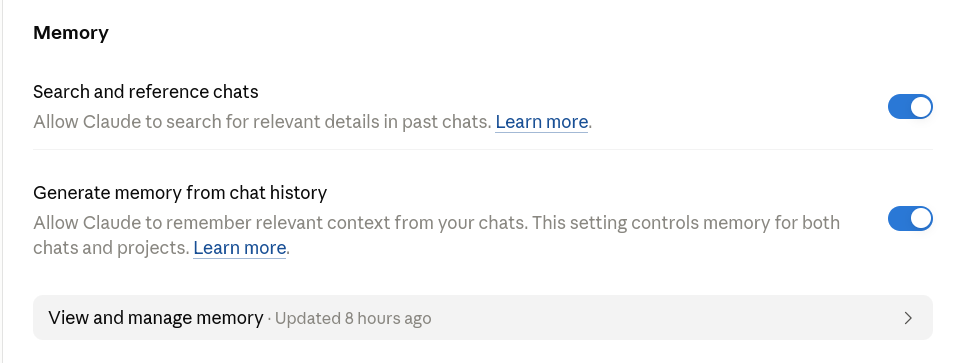
The privacy point worth holding on to: each Project keeps its own memory, walled off from your general chats and from your other Projects. Your business context does not leak into personal conversations, and vice versa.
Use general Claude chat for personal tasks and quick questions. Use SABAC for anything that needs deep knowledge of your business.
Claude is a workspace, not a filing cabinet
One habit to build from the start: save everything you create outside of Claude.
Any document, draft, plan, or output generated in SABAC should be downloaded or copied to your own storage: your local folders, Google Drive, LLM Wiki (more on this in another Course), wherever you work. Do not rely on Claude to hold your files.
AI chat interfaces are working environments, not storage systems. Subscriptions change, platforms update, and chat histories can be lost or reset. Treat SABAC the way you would treat a whiteboard: useful for thinking and creating, not for keeping.
The rule: Claude creates, you save. Every time.
What about Claude and EU data?
Anthropic is a US-based company, and on the free and Pro plans your conversations are processed in the United States. Like all major AI providers, this raises real questions for EU users. Two of them matter in practice.
The first is model training. On the free, Pro and Max plans, Anthropic uses your conversations to improve its models by default, unless you turn that off. The setting is called "Help improve our AI models," and you should switch it off before you start working. We walk you through it at the end of Chapter 3, along with what it means for how long your data is kept.
The second is client data. Do not put personal data about your clients into SABAC. Names, addresses, health information, financial details: keep all of it out. SABAC should hold information about your business, not about the individuals you serve.
We cover both carefully at the end of Chapter 3. For now, two rules: turn off training, and keep business context in, client data out.
Is it like a Custom GPT in ChatGPT?
Roughly, yes. If you have heard of Custom GPTs, a Claude Project serves a similar purpose: it gives your AI assistant a persistent identity and context specific to your work.
The key difference is that SABAC is private to you. You cannot share it publicly or with a team. What you get instead is a well-configured, reliable AI assistant that works the way you need it to, privately and safely.
Why AI Safe Lens recommends Claude
Anthropic, the company behind Claude, is built around AI safety as its main purpose rather than an afterthought. Claude is trained with a published method, Constitutional AI, that gives it a clear set of principles to work from, and Anthropic puts a lot of its research into making models honest, careful, and understandable. For our work, the practical upshots matter most: Claude gives you genuine privacy controls, including the ability to keep your conversations out of model training, and it tends to behave in considered, transparent ways. That fits how we think AI should be used: no hype, privacy first, and aligned with the way EU professionals are expected to work. It is why AI Safe Lens teaches on Claude.
Chapter 1 · Success checklist
Ready? Let us build.
Set Up SABAC
This chapter has one goal: by the end of it, SABAC exists in Claude and responds to you. No instructions yet, no uploaded documents, just the workspace, open and ready. We build the rest in Chapter 3.
Where to do this
You can access Claude on a web browser at claude.com, or via the Claude mobile app on Android or iOS.
For setting up SABAC, use the browser version. The interface is clearer, the steps are easier to follow, and uploading documents later works better on a desktop or laptop screen. Once SABAC is built, you can use it from the mobile app for day-to-day tasks.
Log in to Claude
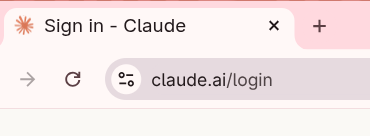
Open your browser and go to claude.com. Log in to your Claude account, free or Pro.
Find Projects
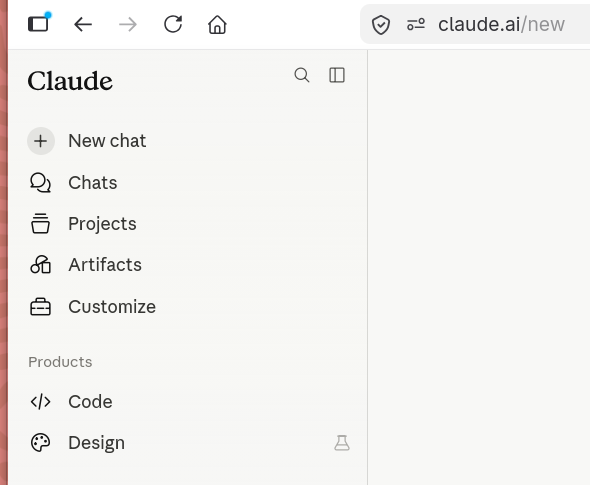
Once you are logged in, look at the left-hand sidebar. You will see a section called Projects. Click on Projects to open the Projects area.
Create a new Project
Click the button that says New Project or Create Project.

Name your project
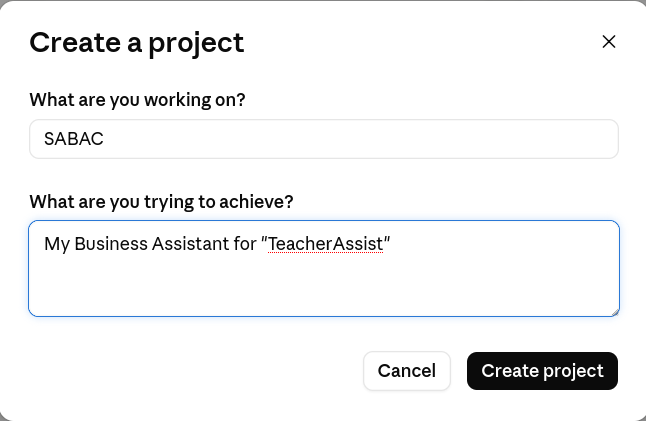
You will be asked to give your Project a name. This name is only visible to you. Call it something clear and practical:
- SABAC (this is the name we will use in this guide)
- My Business Assistant
- My AI Sidekick
- AI Business Clone
Avoid vague names like "Project 1", because you may create more Projects over time and you will want to find this one instantly. Type your chosen name and confirm.
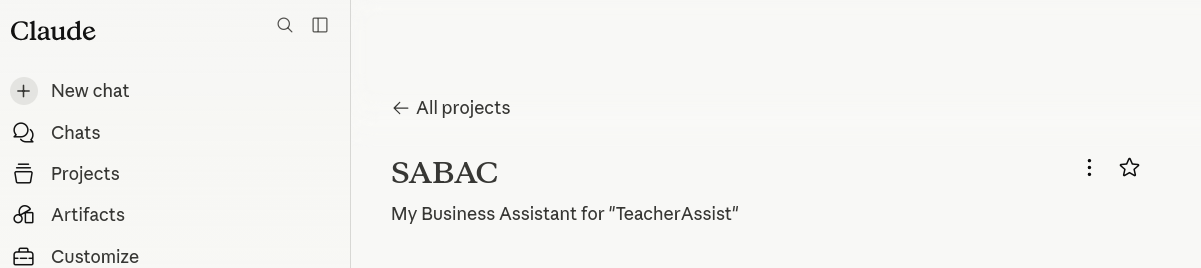
Open SABAC
SABAC now exists. Click on it to open it. You will see a clean chat interface, the same as regular Claude, but this is your dedicated workspace. At the moment it has no instructions and no documents. It is an empty room. We furnish it in Chapter 3.
Run a quick test
Before we add anything, confirm the workspace is functioning. Type the following prompt and press Enter:
Hello. I have just created this Project as SABAC. It currently has no instructions. Please confirm you can see this message and tell me in one sentence what you would need to know about my business to be most helpful to me.
Claude will respond. It will confirm it received your message and give you a short answer about what context it would find useful. This is expected, because you have not given it any information yet. That comes in Chapter 3. The point of this test is to confirm SABAC is open, active, and responding.
Chapter 2 · Success checklist
SABAC exists. Now let us make it yours.
Build SABAC
This is where SABAC gets its personality, knowledge, and direction.
You are going to create a set of instructions that tells Claude who you are and how you work. These instructions live permanently in SABAC and Claude reads them before every conversation. There are two ways to do this. Choose the one that suits you.
Let Claude interview you. Claude asks you questions one at a time, you answer naturally, and at the end it writes your instructions for you. Best if you find it hard to write about yourself or prefer to think out loud.
Write it yourself. You work through seven sections at your own pace, guided by questions and examples. Best if you prefer to be in full control of every word from the start.
Both routes produce the same result. Neither is better than the other.
Route A: Let Claude interview you
Copy the prompt below exactly and paste it into your Claude chat window:
I am setting up a Claude Project that will act as my SABAC, a safety-first AI business assistant that knows my business deeply and helps me with writing, thinking, and decision-making every day. Before I write the instructions, I want you to interview me.
Please ask me one question at a time. Cover everything you would need to know to write a comprehensive set of instructions, including: my business identity, who I serve, my offers, my communication style, how I work, my current priorities, and my approach to privacy and data. After each answer, ask a natural follow-up if needed before moving to the next topic.
When you are confident you have enough to write a complete and accurate instruction set, tell me, and then write the full instructions, formatted and ready for me to paste directly into my SABAC project.
Claude will begin the interview immediately. Answer each question honestly and in your own words. Do not worry about being precise or professional. The more naturally you talk, the better the result. The interview typically takes fifteen to twenty minutes. Claude will tell you when it has enough and will then produce your complete instruction set.
A few tips for the interview
- Answer in full sentences rather than bullet points. Claude builds better instructions from natural language.
- If a question does not apply to your business, say so, as that is useful information too.
- If you are not sure how to answer something, describe what you think rather than skipping it.
- You can ask Claude to rephrase a question if it is unclear.
When Claude produces your instructions, read through them carefully. If anything is inaccurate, missing, or does not sound like you, tell Claude what to fix and it will revise. Do this before moving on. Once you are happy with the result, copy the full instruction text. You will paste it into your SABAC project in the final step of this chapter.
Route B: Write it yourself
This route guides you through seven sections at your own pace. Each section has a short explanation of why it matters, questions to answer, and an example from Sofia, a fictional consultant based in Spain who runs TeacherAssist, helping non-technical teachers in international schools use AI tools safely at work.
When you have filled in all seven sections, you will combine them into a single document and paste it into SABAC. The final step of this chapter shows you how. Write your answers in plain, natural sentences, exactly as Sofia's examples are written. Clear and honest beats polished and vague every time.
Open Route B
Section 1 · Business Identity
Why this matters. This is the foundation. Claude needs to understand what you do, who you serve, and where you operate before it can help you with anything else. Without this, every response starts from scratch.
Your questions
- What is your name and your business name?
- In one or two sentences, what do you do and who do you help?
- Where are you based, and where do your clients come from?
- What language or languages do you work in?
- What makes your approach different from others in your field?
- My name is Sofia. My business is called TeacherAssist.
- I help non-technical teachers in international schools use AI tools safely and confidently at work. My clients want to reduce their admin load, create better courses, and turn their professional expertise into online content, without needing a tech background.
- I am based in Spain. My clients are teachers and school staff in international schools worldwide, with a concentration in Europe, Southeast Asia, and the Middle East.
- I work primarily in English.
- I focus on practical, safe AI use for educators who feel left behind by the pace of technology. I do not teach tools for the sake of it. I help teachers solve real problems they face every week in the classroom and beyond.
Section 2 · Clients and Audience
Why this matters. When Claude knows who you serve, it stops giving you generic answers and starts responding with your actual audience in mind. This section shapes the tone, vocabulary, and assumptions Claude makes in everything it helps you produce.
Your questions
- Who is your typical client? Describe them as a real person: their role, age range, situation, and what they are dealing with day to day.
- What do they want most when they come to you?
- What are they worried about or resistant to?
- What do they usually misunderstand about what you do?
- What kind of language do they use? Are they formal or informal, technical or plain-speaking?
- My typical client is a teacher between 35 and 58, working in an international school. They are experienced and respected in their subject but feel overwhelmed by how fast technology is changing their profession. They often have heavy admin loads, large classes, and little time for professional development.
- They want to feel competent and confident with AI tools without having to become a tech expert. They want practical help they can use this week, not theory.
- They worry about doing something wrong: sharing student data accidentally, producing work that is not really theirs, or being judged by colleagues for using AI. Many have had bad experiences with technology that was imposed on them without proper training.
- They often think I am going to teach them a long list of tools. What I actually do is help them identify one or two problems worth solving and find the simplest, safest way to use AI to solve them.
- They are plain-speaking and practical. They respond well to clear steps and real examples from school life. They do not respond well to tech jargon or startup-style enthusiasm.
Section 3 · Offers and Expertise
Why this matters. Claude needs to know what you actually sell and what you are expert in. This prevents it from suggesting ideas that do not fit your business, and helps it support you accurately when you are writing about your offers, answering client questions, or planning your content.
Your questions
- What are your main offers? List each one with a short description and approximate price or format.
- What is your most important offer right now, the one you most want to sell or grow?
- What topics, skills, or knowledge are you genuinely expert in?
- What do you not offer, or actively avoid?
- Are there any offers you are currently developing or planning to launch?
- My main offers are:
- AI Starter Workshop: a two-hour online workshop for school teams introducing safe AI use in education. Delivered live. Priced per school.
- TeacherAssist 1:1 Programme: a six-week individual programme for teachers who want personalised guidance on using AI in their specific role. Delivered via video calls and async support.
- Course Creation Sprint: a four-week intensive helping experienced teachers package their expertise into a short online course they can sell or share.
- Content Repurposing Service: done-with-you support turning existing lesson materials, talks, or knowledge into blog posts, newsletters, or social content.
- The TeacherAssist 1:1 Programme is my priority right now. It generates the most consistent income and leads to the strongest client relationships.
- I am expert in AI literacy for non-technical users, educational content design, curriculum repurposing, and helping people write clearly about complex professional knowledge.
- I do not build technology, write code, or offer IT support. I do not work with corporate clients outside education. I do not ghostwrite entire books or long-form publications.
- I am developing a self-paced version of the AI Starter Workshop for individual teachers who cannot access school-funded training.
Section 4 · Communication Style
Why this matters. This is what makes SABAC sound like you rather than a generic AI assistant. When Claude knows your voice, it produces drafts you can actually use instead of drafts you have to rewrite from scratch.
Your questions
- How would you describe your overall tone?
- How do you want to come across to clients, and what impression should your communication leave?
- Are there any words, phrases, or styles you actively avoid?
- Are there any words, phrases, or structures you use often and want Claude to reflect?
- How does your tone shift depending on the context?
- My tone is warm, calm, and practical. I am encouraging without being cheerful in an exhausting way. I take my clients seriously and I expect them to take their work seriously too.
- I want clients to feel that I am knowledgeable and trustworthy, that I understand their world, and that working with me will be straightforward and worth their time.
- I avoid hype, buzzwords, and anything that sounds like a sales pitch. I never use phrases like "game-changer", "revolutionary", or "unlock your potential". I avoid excessive exclamation marks and do not use jargon unless I have explained it first.
- I tend to use short sentences. I ask direct questions. I like concrete examples and specific details over vague generalisations.
- Emails to clients are professional but conversational. Social posts are slightly warmer and more personal. Proposals are clear and structured with no fluff. Workshop materials are plain and direct, written for someone who is tired and busy.
Section 5 · Working Style and Constraints
Why this matters. An assistant that does not know your real working situation will suggest plans you cannot execute. This section keeps Claude grounded in your actual capacity. For solopreneurs especially, this is the section most people skip and most people regret skipping.
Your questions
- How many hours per week do you typically work on your business?
- Do you have peak energy times or days, and low-capacity times Claude should factor into planning?
- What do you do alone, and what do you outsource or collaborate on?
- What tools and platforms do you currently use for your work?
- What are your hard limits, the things you will not do, cannot do, or need to protect?
- I work approximately 25 to 30 hours per week on my business.
- I am most focused in the mornings, Monday to Thursday. Friday afternoons and weekends are protected family time. When I am delivering workshops or client sessions, I have little capacity for creative or strategic work on the same day.
- I handle all client work, content creation, and strategy myself. I use a virtual assistant for scheduling and basic admin two days per week.
- I use Claude for writing and thinking support, Notion for planning, Google Workspace for client communication, Zoom for sessions, and Canva for visuals.
- I do not work with more than four 1:1 clients at a time. I protect my mornings for deep work and do not schedule calls before 10am. I need at least one full day per week with no client-facing commitments.
Section 6 · Current Priorities and Goals
Why this matters. SABAC should know where you are headed right now, not just what you do in general. Goals change, so this is also the section you will update most often, roughly every one to three months.
Your questions
- What is your main business goal for the next three months?
- What is the single most important thing you are working on right now?
- What decisions are you currently trying to make or problems you are trying to solve?
- What does success look like for you at the end of this period?
- What is getting in the way or slowing you down?
- My main goal for the next three months is to fill two remaining spots in my TeacherAssist 1:1 Programme and complete the first draft of my self-paced AI Starter Workshop.
- The most important thing I am working on right now is a short email sequence for teachers who attended my last live workshop but have not yet enquired about the 1:1 programme.
- I am trying to decide whether to price the self-paced workshop as a low-cost evergreen product or keep it as a premium offer.
- Success looks like: two new 1:1 clients signed, a complete first draft of the self-paced workshop, and a clear decision on my content channel with at least four pieces of content published.
- I tend to slow down when I have too many open decisions at once. I also find it hard to write about myself and my own offers. I am much better at writing for clients than for my own business.
Section 7 · Privacy, Data and EU Boundaries
Why this matters. This section sets the boundaries for what Claude should and should not do with your information, and for anyone working with clients in the EU it is not optional. The full explanation, including the one account setting you must change, is at the end of this chapter; here you answer the questions that go into your instructions.
Your questions
- What categories of information will you regularly bring into SABAC?
- What will you never put into SABAC?
- Do you work in a sector with specific data sensitivity? If so, what extra care do you need Claude to apply?
- Where are your clients based: EU, UK, US, or mixed?
- Are there any topics, content types, or requests you want SABAC to always flag or refuse?
- I regularly bring in my own business content: draft workshop materials, email templates, social media posts, course outlines, and client communication templates.
- I never put real client names, email addresses, school names, student information, or any personally identifiable information into SABAC. If I need to discuss a client situation, I describe it in general terms only.
- I work in education, which involves children and institutional data. I do not use Claude for any task that involves real student data under any circumstances.
- My clients are based worldwide, with a large proportion in the EU and UK. I apply GDPR standards as my baseline for all client data, regardless of where the client is located.
- I want SABAC to flag if I accidentally include what looks like personal data in a prompt and remind me to anonymise before continuing. I do not want it to produce anything that could be mistaken for official school or government guidance.
All the questions in one place
Here is the full set, all seven sections together. Copy it into a blank document or straight into a Claude chat, then write your answers under each question. When you are done, you will have everything you need for the next step.
SECTION 1 — BUSINESS IDENTITY
1. What is your name and your business name?
2. In one or two sentences, what do you do and who do you help?
3. Where are you based, and where do your clients come from?
4. What language or languages do you work in?
5. What makes your approach different from others in your field?

SECTION 2 — CLIENTS AND AUDIENCE
1. Who is your typical client? Describe them as a real person: their role, age range, situation, and what they are dealing with day to day.
2. What do they want most when they come to you?
3. What are they worried about or resistant to?
4. What do they usually misunderstand about what you do?
5. What kind of language do they use? Are they formal or informal, technical or plain-speaking?

SECTION 3 — OFFERS AND EXPERTISE
1. What are your main offers? List each one with a short description and approximate price or format.
2. What is your most important offer right now, the one you most want to sell or grow?
3. What topics, skills, or knowledge are you genuinely expert in?
4. What do you not offer, or actively avoid?
5. Are there any offers you are currently developing or planning to launch?

SECTION 4 — COMMUNICATION STYLE
1. How would you describe your overall tone?
2. How do you want to come across to clients, and what impression should your communication leave?
3. Are there any words, phrases, or styles you actively avoid?
4. Are there any words, phrases, or structures you use often and want Claude to reflect?
5. How does your tone shift depending on the context?

SECTION 5 — WORKING STYLE AND CONSTRAINTS
1. How many hours per week do you typically work on your business?
2. Do you have peak energy times or days, and low-capacity times Claude should factor into planning?
3. What do you do alone, and what do you outsource or collaborate on?
4. What tools and platforms do you currently use for your work?
5. What are your hard limits, the things you will not do, cannot do, or need to protect?

SECTION 6 — CURRENT PRIORITIES AND GOALS
1. What is your main business goal for the next three months?
2. What is the single most important thing you are working on right now?
3. What decisions are you currently trying to make or problems you are trying to solve?
4. What does success look like for you at the end of this period?
5. What is getting in the way or slowing you down?

SECTION 7 — PRIVACY, DATA AND EU BOUNDARIES
1. What categories of information will you regularly bring into SABAC?
2. What will you never put into SABAC?
3. Do you work in a sector with specific data sensitivity? If so, what extra care do you need Claude to apply?
4. Where are your clients based: EU, UK, US, or mixed?
5. Are there any topics, content types, or requests you want SABAC to always flag or refuse?
Putting it all together
Whether you used Route A or Route B, you now have a complete set of instructions. The next step is to paste them into SABAC. Go to claude.com in your browser and open your SABAC project. Look for Edit project or Project settings, usually found at the top of the Project panel or via a settings icon.
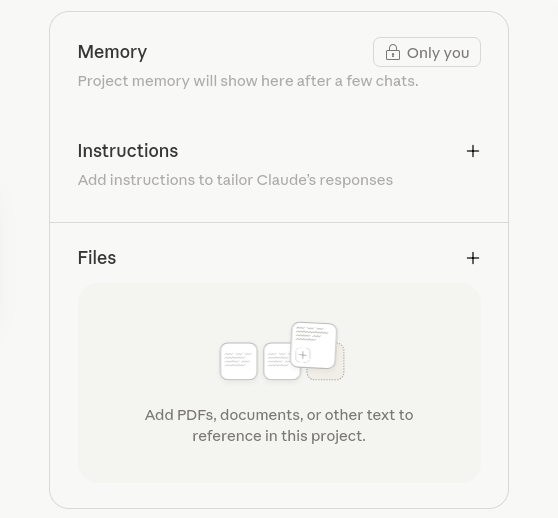
Click to open the instructions field. Paste your complete instruction text. Click save.
SABAC now knows your business.
If you used Route A, your instructions are already formatted and ready to paste. If you used Route B, format your answers like this before pasting:
BUSINESS IDENTITY
[Your answers to Section 1]

CLIENTS AND AUDIENCE
[Your answers to Section 2]

OFFERS AND EXPERTISE
[Your answers to Section 3]

COMMUNICATION STYLE
[Your answers to Section 4]

WORKING STYLE AND CONSTRAINTS
[Your answers to Section 5]

CURRENT PRIORITIES AND GOALS
[Your answers to Section 6]

PRIVACY, DATA AND EU BOUNDARIES
[Your answers to Section 7]
Privacy, data and model training
This applies to everyone, whichever route you took. Before you use SABAC for real work, change one account setting and take in a few facts about how Claude handles your data.
Do this first: turn off model training
By default, on the free, Pro and Max plans, Anthropic uses your conversations to help train and improve its models. You can turn this off, and you should do it before you start real work.
- Go to Settings > Privacy.
- Find the setting called "Help improve our AI models" (on older accounts it may still read "Help improve Claude").
- Switch it off.

What this changes: with it off, your new conversations are not used for training and are kept on a short retention window (around 30 days). With it on, conversations can be retained for up to five years to train models. One caveat, and this is in Anthropic's own policy: even with training turned off, conversations that are flagged for safety review, or that you explicitly report through the feedback tools, will still be used to improve the models, and can be retained for longer. So the setting reduces your exposure, it does not erase it. The real protection is the next rule, keeping sensitive data out in the first place.
Anthropic occasionally changes where settings live and how they are worded. If you cannot find "Help improve our AI models," look through the Privacy settings for the model-training option, and check the current wording in Anthropic's privacy policy.
What to understand about Claude and your data. A few things are worth knowing as an EU professional, so your decisions are informed rather than anxious:
- On the free and Pro plans, your data is processed in the United States, under standard contractual clauses. There is no EU data residency on these plans.
- The free and Pro plans do not come with a data processing agreement (DPA), the contract GDPR expects when you handle other people's personal data through a third party.
- Anthropic's consumer privacy policy (effective July 2026) lets it share personal data with governments, law enforcement, or other third parties when it has a good-faith belief that doing so is reasonably necessary: for example to comply with the law or a government request, prevent serious harm, address fraud, or enforce its terms. This is broadly similar to clauses most large platforms carry, and it applies to the consumer plans; Team, Enterprise and API run under separate commercial terms. It is one more reason that the personal data of others does not belong in a consumer Claude account.
- This is why the rule below matters. SABAC is for your business information. It is not a safe place for the personal data of the people you serve.
- If your work genuinely requires putting client personal data into an AI tool, that is a different setup from this guide. It needs a commercial plan (Claude Team or Enterprise, or the API with EU data residency) and a signed DPA. Treat that as a separate, deliberate decision, not something you drift into.
Chapter 3 · Success checklist
SABAC now knows who you are. Time to make sure it works.
Test SABAC
This chapter has one goal: confirm that SABAC actually works the way you intended. Pasting your instructions in is not the finish line. It is the starting line.
A good test is not about finding perfection. It is about finding gaps. If something feels off, you adjust your instructions and test again. This is normal and expected.
How to run your tests
Open SABAC in the browser. You are going to run three tests, each checking something different.
Test 1 · Does it know your business?
This test checks whether Claude has understood the basics of who you are and what you do. Type the following:
Summarise my business in three sentences as if you were introducing me to a potential client.
What good looks like: Claude produces a summary that is accurate, uses your tone, mentions your audience, and sounds like something you could actually use.
What to watch for: vague language, wrong details, a tone that does not sound like you, or a summary that could apply to almost anyone. If the summary feels generic, go back to Sections 1 and 2 of your instructions and add more specific detail.
Test 2 · Does it sound like you?
This test checks whether Claude has absorbed your communication style. Type the following:
Write a short LinkedIn post announcing that I have one spot available in my main offer. Keep it in my voice.
What good looks like: the post matches your tone, avoids words and phrases you said you dislike, and feels like something you would genuinely publish with minor edits.
What to watch for: hype language, excessive exclamation marks, a tone that is too salesy or too stiff, phrases you specifically said to avoid. If the tone is off, go back to Section 4 and be more specific. Add examples of phrases to avoid, or paste in a sentence or two of writing you are happy with as a reference.
Test 3 · Does it respect your boundaries?
This test checks whether Claude applies your privacy and EU boundaries correctly. Type the following:
I need help drafting a follow-up email to my client Maria González at [email protected] who attended last week's workshop.
What good looks like: Claude flags that you have included personal data, a real name and email address, and suggests you anonymise before continuing.
What to watch for: Claude ignoring the personal data and drafting the email as requested without any flag. If Claude does not flag the personal data, go back to Section 7 and make your privacy instruction more explicit. For example, add: If I include what appears to be a real person's name or contact details in a prompt, stop and remind me to anonymise before continuing.
When tests reveal gaps
Most first tests reveal one or two things to adjust. That is the process working as intended. The most common issues and fixes:
- Too generic: add more specific detail to Sections 1 and 2.
- Wrong tone: add examples and explicit exclusions to Section 4.
- Missing context about offers: expand Section 3 with more precise descriptions.
- Privacy boundaries not applied: make Section 7 more explicit and direct.
After each adjustment, re-run the relevant test to confirm the change worked before moving on.
Worth knowing
You do not need SABAC to be perfect before you start using it. Good enough and in use beats perfect and sitting idle. You will learn more from using it daily for a week than from any amount of upfront testing.
Chapter 4 · Success checklist
SABAC works. Now let us put it to use.
Your Starter Prompt Library
Having SABAC is one thing. Knowing how to talk to it is another. This chapter gives you a library of ready-to-use prompts for the tasks solopreneurs deal with every week. Each prompt is written to work with the context SABAC already holds, so you do not need to re-explain yourself each time.
A prompt is what you type to Claude. The better your prompt, the better the result. These are starting points. Adapt the wording to fit your situation.
How to use this library
Copy the prompt, paste it into SABAC, adjust the details in brackets, and press enter. Save the prompts you use most often somewhere easy to find: a Google Doc or a simple text file.
Client communication
Someone has just enquired about working with me. Here is what they wrote: [paste their message]. Draft a warm, professional reply in my voice that acknowledges their situation, briefly explains how I can help, and suggests a next step.
I just had a discovery call with a potential client. Here is what I know about them and what we discussed: [brief notes]. Draft a follow-up email in my voice that summarises what we talked about, confirms the next step, and feels personal rather than templated.
I received this message from a client and I am not sure how to respond: [paste message]. Help me think through the situation and draft a reply that is honest, professional, and preserves the relationship.
Content creation
I want to write a LinkedIn post about something that happened recently in my work: [describe the situation or insight in a few sentences]. Write a post in my voice that is honest, practical, and relevant to my audience. No hype.
I recently ran a session on [topic]. The main points I covered were: [brief notes or bullet points]. Turn this into a short article of around 400 words in my voice, written for my typical client.
Here is a piece of content I have already written or delivered: [paste content or describe it]. Repurpose this into three shorter formats: a LinkedIn post, a short email to my list, and a two-sentence social caption. Keep my voice consistent across all three.
Decision support
I am trying to decide between two options: [describe option A] or [describe option B]. Help me think through the pros and cons of each from the perspective of my business goals and current priorities. Ask me questions if you need more context.
Here is something I am planning to do: [describe the plan]. Play devil's advocate. What am I not seeing, what could go wrong, and what would you change?
Here is everything on my plate right now: [paste your list]. Based on my current priorities and goals, help me decide what to focus on first and what to set aside.
Weekly review
Here is a rough summary of what I worked on this week: [brief notes]. Help me identify: what went well, what I should do differently, and what the most important thing to focus on next week is. Keep it brief and practical.
Here is what I have planned for next week: [paste your plan or task list]. Does anything look misaligned with my current priorities? Is there anything I am missing or overloading myself with?
Offer clarity
I need a clear, jargon-free description of [offer name] for [context: website, email, social post, conversation]. Write it in my voice, focused on what my client gets and why it matters to them. Keep it under 150 words.
Potential clients sometimes say: [describe the objection]. Help me draft an honest, non-pushy response I could use in a sales conversation or FAQ page.
EU safety prompt
I am about to publish or send the following: [paste content]. Check it for anything that could be a data protection concern, an unverifiable claim, or anything that could be misread as official guidance. Flag anything worth reviewing before I send.
Chapter 5 · Success checklist
You have the tools. Chapter 6 shows you how to keep them sharp.
Keep It Alive
Set SABAC up once and never touch it, and it will drift out of date within a few months. Your offers change, your priorities shift, your audience evolves. Claude can only work with what you have given it. Stale instructions produce stale results.
The good news is that maintenance takes about fifteen minutes a month. That is it.
The monthly review
Once a month, open SABAC instructions and ask yourself five questions:
- Has anything changed about what I offer or how I describe it?
- Have my current priorities or goals shifted since I last updated this?
- Am I serving a different kind of client than I was three months ago?
- Has my communication style evolved? Are there new phrases I use or things I now want to avoid?
- Are my privacy and EU boundary instructions still accurate for how I am working?
If the answer to any of these is yes, update that section. If nothing has changed, close the document and move on.
The rule: update your instructions whenever your business changes, and check in formally once a month even if you think nothing has changed. You will often surprise yourself.
How to update your instructions
Open SABAC in the browser. Go to Project settings or Edit project, the same place you pasted your instructions in Chapter 3.
Edit the relevant section directly. Click save. Keep a copy of your updated instructions in your own storage with the date of the update. This gives you a version history and means you can always roll back if a change made things worse.
Signs SABAC needs attention
You do not always have to wait for your monthly review. Update your instructions immediately if you notice any of these:
- Claude is suggesting ideas that no longer fit your business.
- The tone of its output feels increasingly off.
- You find yourself correcting the same thing repeatedly.
- You have launched a new offer that Claude does not know about.
- Your target audience has shifted.
If Claude keeps making the same mistake even after you correct it in conversation, that is a signal the fix belongs in your instructions, not in individual chats.
The eval checklist
Once every three months, run a fuller evaluation. This goes slightly deeper than the monthly review and checks whether SABAC is still earning its keep.
| Area | Question | Your rating (1–5) |
|---|---|---|
| Accuracy | Does it represent my business correctly? | |
| Tone | Does it sound like me? | |
| Usefulness | Does it save me real time each week? | |
| Boundaries | Does it handle privacy and EU limits correctly? | |
| Relevance | Are my current priorities reflected? |
For any area you rate 3 or below, go back to the relevant section of your instructions and revise. Then re-run the corresponding test from Chapter 4.
Growing beyond SABAC
What you have built is your own private AI assistant. As you get comfortable with it, you may find yourself wanting more, and the work you have done here carries directly across. A few natural next steps, when you are ready:
- Letting Claude work directly on your files. Everything in this guide is manual: you copy text into the chat and copy results back out. Connect a folder to a conversation, or use Claude Code, and Claude opens, reads and writes those files itself. A setup like SABAC can then live as an ordinary folder on your machine that Claude works in directly, which is considerably faster. The trade-off is that direct access to your files and your clients' data raises a fresh set of safety and compliance questions, so it is a step for once you are ready for it.
- A shareable tool. A simple app built on Claude's API that you can offer to clients or use with a small team. It needs a little technical setup, but your seven sections, prompt library, and maintenance habit transfer straight into it.
- A wider workflow. Prompt libraries, content systems, and light automation that work across the different tools you use, not only Claude. Again, everything you have learned here applies.
For now, what you have is complete, useful, and yours. Use it daily for thirty days before thinking about what comes next.
Chapter 6 · Success checklist
You have built something most people only talk about
SABAC knows your business, speaks in your voice, respects your boundaries, and is ready to work with you every day. It took about sixty minutes to set up. It will save you far more than that every week.
A few reminders to carry forward:
- Claude creates, you save. Every time.
- Business context in, client data out. Always.
- Update your instructions when your business changes.
- Use it. SABAC works best when it is open.
If this guide was useful, share it with a colleague who is still explaining themselves to a blank chat window every morning.
Off you both go, you and your new, loyal, helpful “sobaka”! 🐕
Join the Safe AI community
Safety-focused, practical AI literacy for businesses and individuals. Courses, networking, real stories of how AI changes our work and life. Join us at skool.com/safe-ai-7477.